



How to Use Subject Rotation in AtomEmailPro
When sending emails to a large recipient list, you may not want every recipient to receive exactly the same subject line and email content.
AtomEmailPro provides several ways to rotate your email subject and body content.
You can:
- Create multiple subjects and email bodies and let AtomEmailPro randomly select them when sending.
- Use Spintax to rotate only the subject line.
- Import a different subject and body for each recipient and use
[subject]and[body]variables.
This FAQ explains how each method works.
1. How to Rotate Both Subject and Email Body?
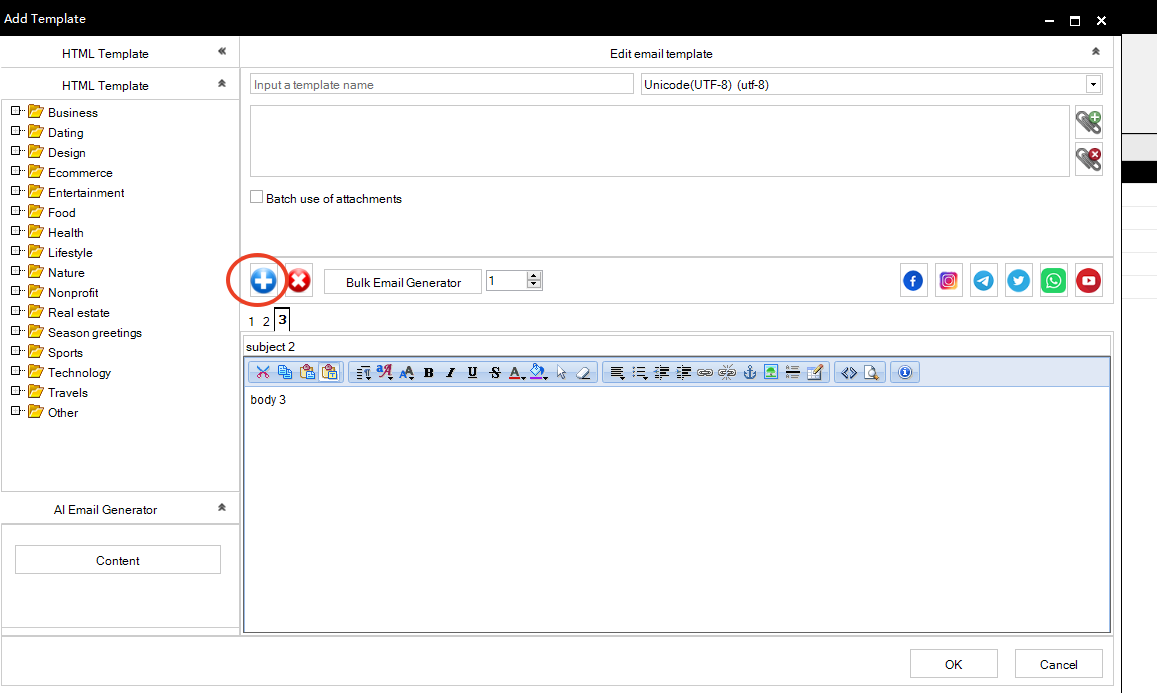
If you want AtomEmailPro to randomly select different subjects and different email bodies when sending, you can create multiple email versions.
For example, you can prepare:
Subject 1:
Special Offer for You
Body 1:
Hi,
We have a special offer available for you. Please check the details below.
Subject 2:
A Quick Update for You
Body 2:
Hello,
I wanted to share a quick update with you. Please take a look at the information below.
Subject 3:
Don't Miss This Offer
Body 3:
Hi,
We would like to let you know about a new offer. You can find more information below.
When AtomEmailPro sends the emails, it can randomly select one of these email versions.
For example:
- Recipient A → Subject 1 + Body 1
- Recipient B → Subject 3 + Body 3
- Recipient C → Subject 2 + Body 2
This is useful when you want to prepare several complete email versions instead of sending exactly the same message to everyone.
[Screenshot: Multiple email subject/body versions]
2. How to Rotate Only the Subject Line?
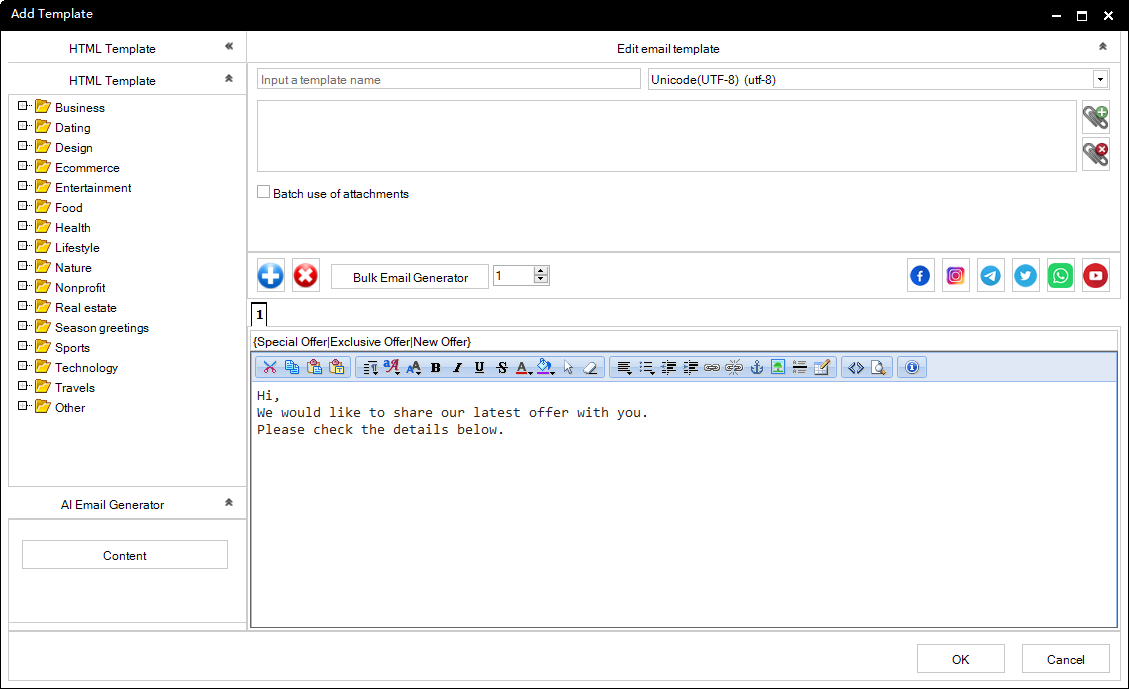
If you want to keep the email body the same but use different subject lines, you can use Spintax in the subject field.
For example:
{Special Offer|Exclusive Offer|New Offer|Limited Offer}When the email is sent, AtomEmailPro will select one of the available subject variations.
For example, different recipients may receive:
Special Offeror
Exclusive Offeror
New Offeror
Limited OfferThe body of the email can remain exactly the same.
Example
Subject:
{Special Offer|Exclusive Offer|New Offer}Body:
Hi,
We would like to share our latest offer with you.
Please check the details below.
This method is useful when you only need subject rotation and do not need to create multiple complete email templates.
[Screenshot: Spintax used in the Subject field]
3. How to Send a Different Subject and Body to Each Recipient?
If every recipient already has their own subject and email content, you do not need to create multiple email versions manually.
Instead, you can include the Subject and Body columns in your recipient list when importing your contacts.
For example, your recipient file can contain:
| recipient | subject | body |
|---|---|---|
| [email protected] | Special Offer for John | Hi John, please check our latest offer. |
| [email protected] | A Quick Update for Mary | Hi Mary, I wanted to share this information with you. |
| [email protected] | New Offer for David | Hi David, here are the details of our new offer. |
Instead of importing only the recipient column, import the additional subject and body columns as well.
Then, in AtomEmailPro, use the following variables:
[subject]for the email subject, and:
[body]for the email body.
Example
Set the email subject to:
[subject]Set the email body to:
[body]AtomEmailPro will then use the corresponding values from your recipient list.
For example:
John receives:
Subject: Special Offer for John
Hi John, please check our latest offer.
Mary receives:
Subject: A Quick Update for Mary
Hi Mary, I wanted to share this information with you.
David receives:
Subject: New Offer for David
Hi David, here are the details of our new offer.
This gives you full control over the subject and body of each individual email.
[Screenshot: Recipient list with recipient, subject and body columns]
[Screenshot: Using [subject] and [body] variables in AtomEmailPro]
Which Method Should You Use?
It depends on what you want to rotate.
I want multiple complete email versions
Use multiple subjects + multiple bodies.
AtomEmailPro can randomly select an email version when sending.
I only want to rotate the subject
Use Spintax in the subject field.
Example:
[Special Offer|Exclusive Offer|New Offer]I want every recipient to have their own subject and body
Import the recipient, subject, and body columns together, then use:
[subject]as the subject and:
[body]as the email body.
Quick Comparison
| Method | Subject | Body | Best For |
|---|---|---|---|
| Multiple email versions | Rotated | Rotated | Several complete email versions |
| Spintax | Rotated | Same | Subject-only rotation |
[subject] + [body] | Per recipient | Per recipient | Fully customized emails |
FAQ
Can I rotate only the subject without changing the email body?
Yes. Use Spintax in the subject field while keeping your email body unchanged.
Can I rotate both the subject and body?
Yes. Create multiple subject/body combinations and let AtomEmailPro select the email version when sending.
Can each recipient have a completely different subject and body?
Yes. Import the subject and body together with your recipient list, then use [subject] and [body] in the email task.
Do I have to import only the recipient column?
No. If you want recipient-specific content, you can import additional columns such as subject and body and use them as variables.
What is the easiest method for simple subject rotation?
If you only need several subject variations, Spintax is the simplest option.
For example:
{Special Offer|Exclusive Offer|New Offer|A Quick Update}Summary
AtomEmailPro gives you three flexible ways to vary your email content:
Multiple versions → rotate complete subject + body combinations.
Spintax → rotate the subject while keeping the body unchanged.
[subject] + [body] → give each recipient their own subject and email content from the imported recipient list.
Choose the method that matches the level of customization you need.