



What Should I Enter as the Serial Number in AtomEmailPro? The Answer Is Probably Easier Than You Think 😂
We have a small confession to make.
We pinned a message in our Telegram Channel.
The pinned message contains:
- The AtomEmailPro download link
- The free version information
- The free version serial number
And yet...
We still receive messages like:
“What should I enter for the serial number?”
“Where can I find the license?”
“What is the license key for the free version?”
“What should I put in the Serial Number field?”
At this point, we don't know whether to laugh, cry, or make the answer even bigger. 😂
So we decided to write this article.
If you are using the free version of AtomEmailPro, please remember one thing:
The Free Serial Number Is:
AtomEmailProFreeCode
That's it.
Really.
No secret code.
No complicated activation process.
No treasure map.
No ancient password hidden under a rock.
Just:
AtomEmailProFreeCode
What Should I Enter in the AtomEmailPro Login Screen?
The AtomEmailPro login screen asks for three things:
Name
Serial Number
For the free version, you can enter your information like this:
| Field | What to Enter |
|---|---|
| Name | Your name |
| Your email address | |
| Serial Number | AtomEmailProFreeCode |
The most important one is the last field.
If you are using the free version, your serial number is:
AtomEmailProFreeCode
Please copy it exactly.
“But Where Is My License?”
This is probably the most common question.
The answer is simple:
You don't need to wait for a personal license to be sent to you.
The free version uses the shared free serial number:
AtomEmailProFreeCode
So if you see a field called:
Serial Number
or
License
you know what to enter.
Yep.
You guessed it.
AtomEmailProFreeCode 😄
We Even Pinned the Message on Telegram 😂
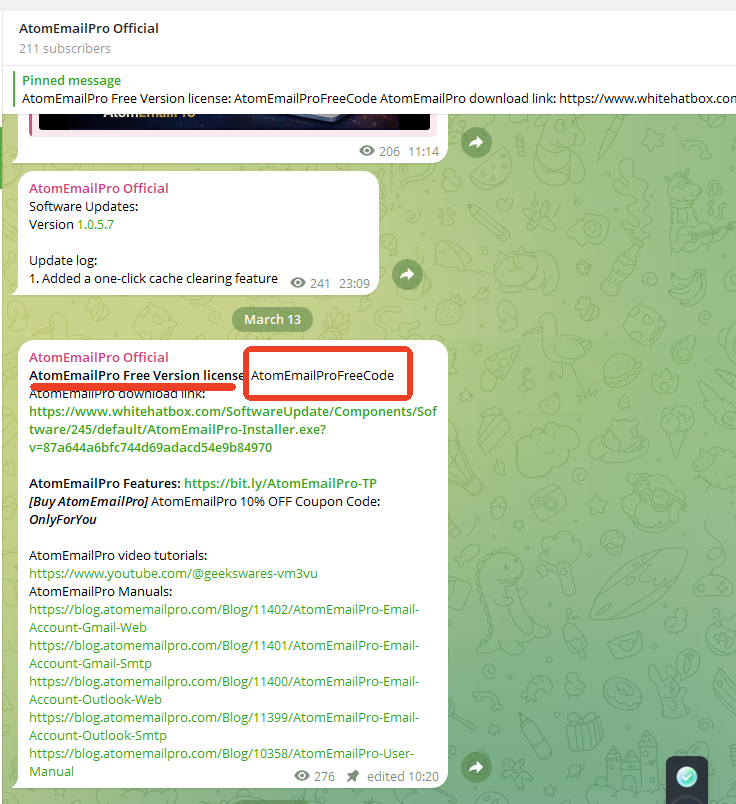
We should probably explain why we're writing this article.
We already have a pinned message in our Telegram Channel.
The pinned message includes the information you need to get started with AtomEmailPro, including the download link and the free serial number.
But apparently, some people have a special relationship with pinned messages.
They see:
📌 Pinned Message
And think:
“Interesting. I wonder what this is.”
Then they open AtomEmailPro.
They see:
Serial Number: ______
And immediately contact us:
“What should I enter?”
😂
So here we are.
Writing an entire article about one line of text.
If You're Using the Free Version, Remember This One Line
Let's make it as easy as possible.
If you forget everything else in this article, remember this:
AtomEmailProFreeCode = Free Version Serial Number
That's the whole story.
You can even save it somewhere.
Take a screenshot.
Copy it into your notes.
Or simply remember the name:
AtomEmailProFreeCode
It is not complicated.
It is not personalized.
It is not different for every user.
The free version uses:
AtomEmailProFreeCode
Why Do You Need a Serial Number?
You may be wondering why the login screen asks for a serial number at all.
The AtomEmailPro login screen uses three basic fields:
Name + Email + Serial Number
The serial number tells the application which version or license you are using.
For the free version, the code is:
AtomEmailProFreeCode
So there is no need to search through your email inbox for a mysterious license email.
There is no need to send us a message asking:
“Can you give me the free license?”
It's already here.
Right here.
In this article.
And in the pinned Telegram message. 😄
Still Can't Find It?
Okay, let's make this absolutely impossible to misunderstand.
Imagine you just installed AtomEmailPro.
The application asks:
Name:
→ Enter your name.
Email:
→ Enter your email.
Serial Number:
→ Enter:
AtomEmailProFreeCode
That's the answer.
If you are using the free version, that's the code you need.
One More Thing About the Telegram Channel
If you are an AtomEmailPro user, our Telegram Channel is a good place to check before contacting support.
We may post:
- Download links
- Free version information
- Important updates
- Product announcements
- Usage information
- Answers to common questions
And yes...
Sometimes the answer is already sitting there in a pinned message. 😂
So before asking:
“Where is the download link?”
or
“What is the free serial number?”
please take a quick look at the pinned message.
It might save you—and us—a few messages.
The 5-Second AtomEmailPro Cheat Sheet
Let's finish with the world's shortest AtomEmailPro guide.
Want to use the free version?
Download AtomEmailPro.
Open the login screen.
Enter your name.
Enter your email.
Enter:
AtomEmailProFreeCode
Done.
That's it.
You can now get started with the free version.
Final Reminder
We love receiving questions from AtomEmailPro users.
Seriously.
But if your question is:
“What should I enter as the serial number for the free version?”
We hope this article saves everyone some time. 😂
The answer is:
AtomEmailProFreeCode
Please remember it.
Please save it.
Please bookmark this page if necessary.
And most importantly...
Please check the pinned Telegram message before asking. 😄
Because yes...
The serial number was there all along.