



AtomEmailPro Now Supports Google Workspace Accounts for Gmail Web Sending
If you use Google Workspace for business email, your email address may not end with @gmail.com.
For example, instead of:
you may use a custom business email such as:
Even though the address uses your own domain, the mailbox can still be managed through Google Workspace and accessed through the Gmail web interface.
AtomEmailPro now supports this type of Google Workspace account for Gmail browser-based sending.
What Is the New Google Workspace Feature?
AtomEmailPro can automate email sending through the Gmail web interface.
With the new update, Google Workspace accounts using a custom domain can also be used for Gmail web sending.
For example:
If these accounts are hosted on Google Workspace, you can add them to AtomEmailPro and use them for browser-based Gmail sending.
The email address does not need to be @gmail.com.
How to Enable It
The setup is simple.
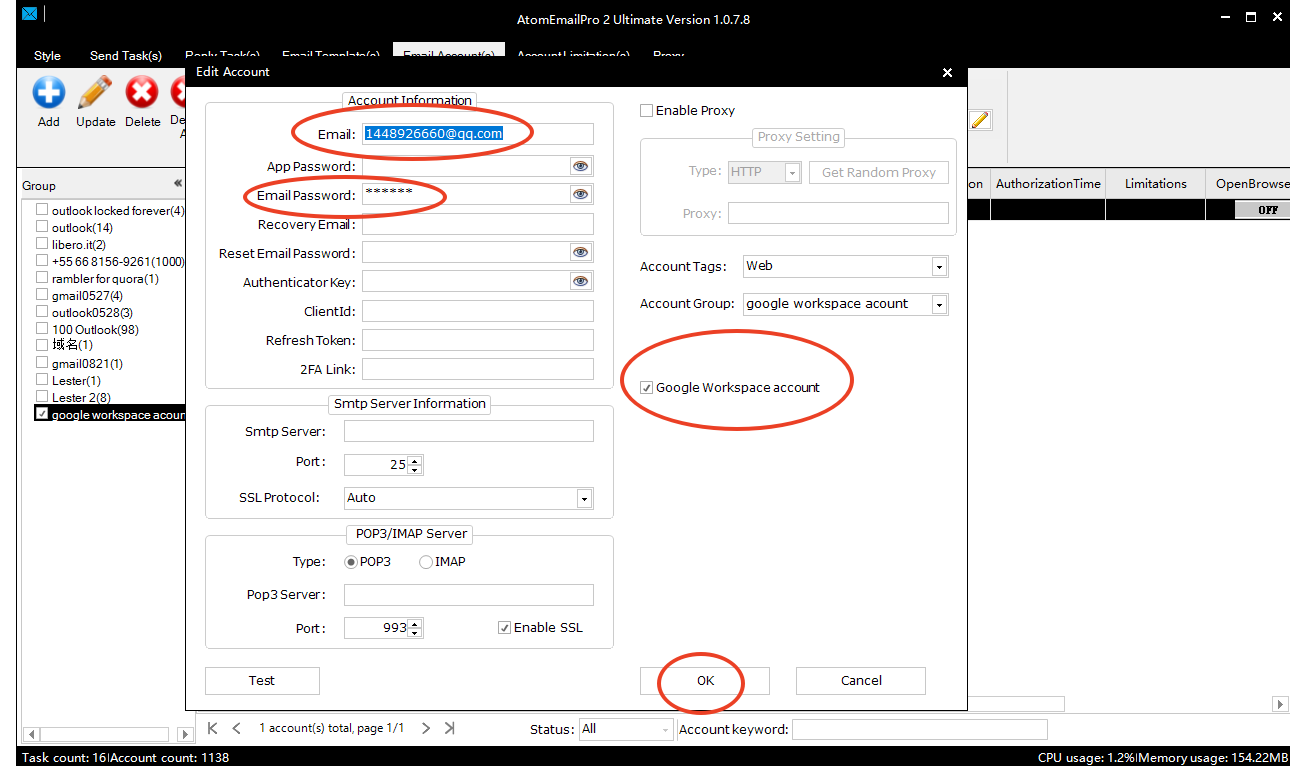
After adding your Google Workspace account to AtomEmailPro, open the account settings.
Find the option indicating that the account is a Google Workspace account and enable it.
Once the account is identified as a Google Workspace account, AtomEmailPro can use the Gmail web interface for automated sending.
The basic process is:
Add account → Enable Google Workspace → Log in through Gmail Web → Start automated sending
This is especially useful for businesses that use their own domain for email communication.
Why Does This Matter?
Many companies don't use standard @gmail.com addresses for business communication.
They use Google Workspace with their own domain because it allows them to keep a professional business email address while using Google's email infrastructure.
For example, a company may have:
instead of:
From the user's perspective, it is still a Google Workspace mailbox and can be accessed through Gmail.
The new AtomEmailPro feature makes it possible to use these custom-domain Google Workspace accounts with its Gmail browser sending system.
Browser-Based Sending for Google Workspace
One of the main differences between AtomEmailPro and traditional email sending software is the sending method.
Traditional bulk email software often relies heavily on SMTP configuration.
AtomEmailPro also supports a different approach: browser-based email sending.
Instead of setting up an SMTP server, you can use the actual Gmail web interface through browser automation.
This can be useful when you already have multiple Gmail or Google Workspace accounts and want to manage automated sending from a centralized application.
For Google Workspace users, this means that a custom-domain mailbox such as [email protected] can be used with Gmail Web Sending when the account is correctly configured as a Google Workspace account in AtomEmailPro.
Gmail Account or Google Workspace Account?
The important difference is the email domain.
A standard Gmail account usually looks like:
A Google Workspace account can look like:
The second one does not look like a Gmail account, but it can still use Gmail as its webmail interface.
With the new AtomEmailPro setting, you can tell the software that the account is a Google Workspace account, allowing it to work with Gmail browser-based sending.
Who Can Benefit From This Feature?
This update is particularly useful for:
- Businesses using Google Workspace
- Companies with custom-domain email addresses
- Email marketing teams managing multiple Workspace accounts
- Agencies managing email campaigns for clients
- Users who prefer Gmail Web Sending instead of SMTP
- Teams looking for a browser-based bulk email sender
If your business email is hosted by Google Workspace but does not end with @gmail.com, you can now use the account with AtomEmailPro's Gmail web sending feature.
A More Flexible Way to Send Emails
Google Workspace is widely used by businesses that want professional email addresses under their own domain.
That means Gmail-based email automation should not be limited to @gmail.com addresses.
With this new AtomEmailPro feature, users can identify their account as a Google Workspace account in the account settings and use the account for Gmail browser automation.
Your email address can be [email protected] — it doesn't have to be [email protected]`.
If the mailbox is hosted on Google Workspace and can be accessed through Gmail Web, AtomEmailPro can now support it for browser-based automated sending.
Try Google Workspace Web Sending With AtomEmailPro
If you are using Google Workspace with a custom domain and want to automate email sending through Gmail Web, AtomEmailPro provides a browser-based solution without requiring you to treat the account as a standard @gmail.com mailbox.
Add your account, enable the Google Workspace option in the account settings, and use Gmail Web Sending through AtomEmailPro.