



Do You Really Need an Email API to Send Bulk Emails?
When people talk about bulk email sending, the conversation often moves quickly toward APIs.
Need to send hundreds of emails? Use an API.
Need to automate email? Build an API integration.
Need to scale? Connect your application to an email service.
For developers, this makes perfect sense. APIs are powerful, structured, and designed for software-to-software communication.
But there is a question that is often overlooked:
Do you actually need an email API to send bulk emails?
The answer is no.
An API is one way to automate bulk email sending. It is not the only way.
Another approach is to automate the email service you already use through its web interface. This is where browser-based email automation becomes interesting—and where tools such as AtomEmailPro take a different approach to bulk email sending.
Bulk Email Sending Is a Workflow, Not Just an API Call
It is easy to think of bulk email as a simple technical action:
Select recipients → send emails.
But anyone who has actually worked with email outreach knows that the real process is more complicated.
A typical workflow may involve:
- Preparing a list of recipients
- Preparing email content
- Opening an email account
- Entering recipients
- Entering subject lines
- Inserting message content
- Sending messages
- Repeating the process
- Managing multiple accounts
- Monitoring the overall workflow
The API is only one possible way to control part of this process.
The bigger question is:
How do you want your computer to perform the repetitive work?
That question leads to three common approaches.
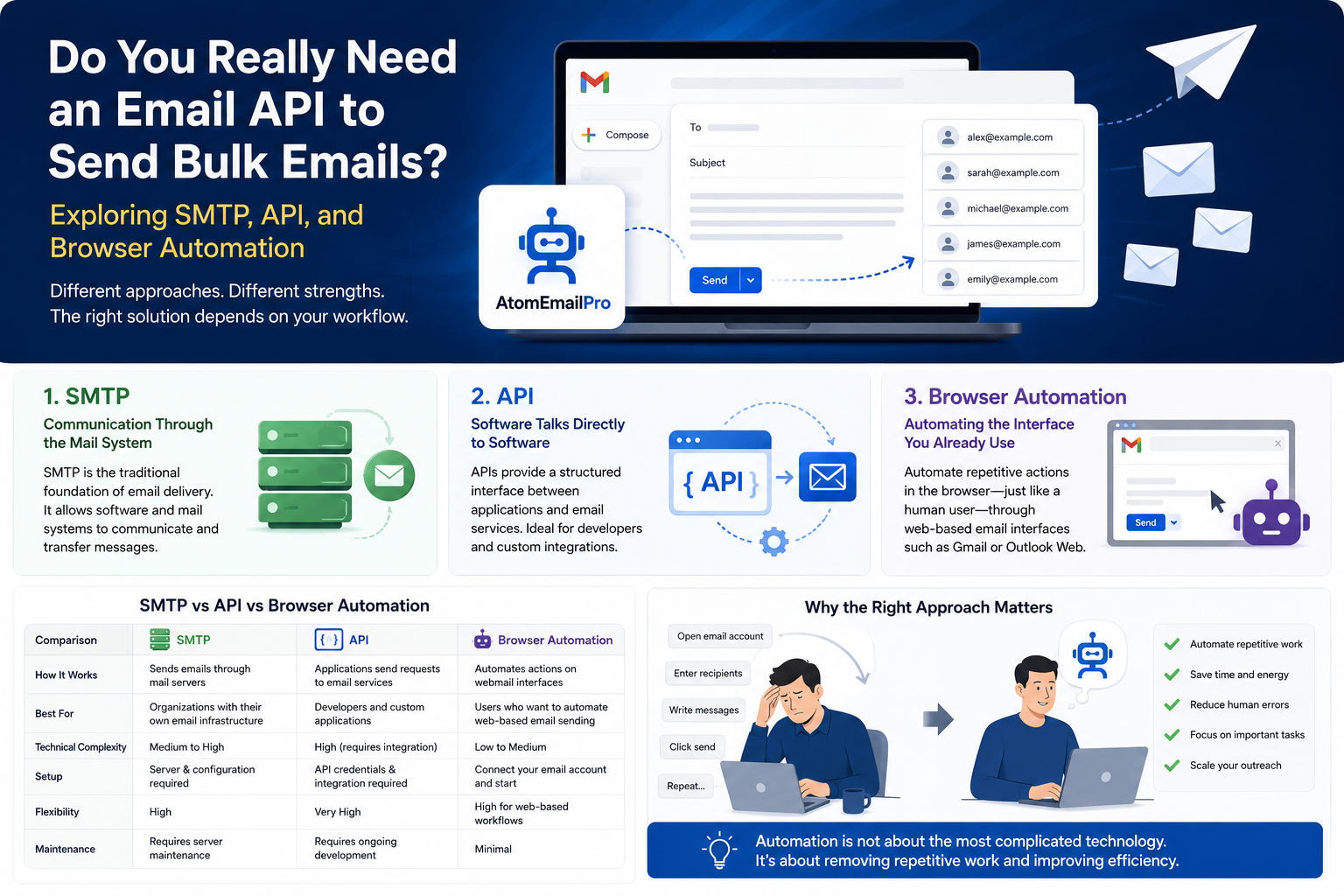
SMTP, API, and Browser Automation: Three Different Approaches
There is no single technology that is universally “the best.”
SMTP, APIs, and browser automation solve the same broad problem—moving email through a system—but they do it in fundamentally different ways.
SMTP: Communication Through the Mail System
SMTP is the traditional foundation of email delivery.
It allows software and mail systems to communicate and transfer messages.
For organizations with their own infrastructure, SMTP can be extremely useful.
But using SMTP does not automatically mean that the entire email workflow is automated.
You still need software, configuration, authentication, and a workflow built around it.
API: Software Talks Directly to Software
An API provides a structured interface between applications.
Your software sends a request.
The email service receives the request.
The email service processes it.
The message is sent.
From a developer's perspective, this is elegant.
For example, an application can theoretically execute a workflow like:
Load recipient → create message → call API → send → record result.
This is one of the cleanest ways to build email functionality into a custom application.
But there is a trade-off.
API-based automation usually requires integration.
Someone has to understand the API.
Someone has to configure authentication.
Someone has to build or configure the software that communicates with the API.
For a development team, this may be completely reasonable.
For someone who simply wants to automate bulk email sending through an existing Gmail or Outlook Web workflow, it can be more infrastructure than they actually need.
Browser Automation: Automating the Interface You Already Use
There is another possibility.
Instead of asking:
“How can my software communicate with an email service through an API?”
you can ask:
“How can software automate the same actions I perform in the browser?”
That is the basic idea behind browser automation.
A user opens Gmail or another webmail interface.
They compose an email.
They enter the recipient.
They enter the subject.
They enter the message.
They click Send.
Browser automation turns those repetitive interactions into a software-controlled workflow.
The important distinction is that the automation happens through the web interface, rather than requiring the user to build a direct API integration.
This does not make browser automation universally better than an API.
It simply makes it useful for a different kind of user and a different kind of workflow.
Why the Difference Matters
Consider two people.
The first is a developer building a SaaS platform.
They want their application to automatically send transactional emails whenever a customer creates an account.
For that situation, an API is probably the natural choice.
The second person runs a small business.
They already use Gmail.
They have a list of business contacts.
They need to send many similar emails as part of their outreach.
They don't want to build an email infrastructure.
They don't want to develop an API integration.
They simply want their existing web-based email workflow to become more efficient.
These two people have completely different requirements.
Yet they are often told the same thing:
“You need an API.”
Maybe they don't.
This Is Where AtomEmailPro Fits
AtomEmailPro approaches bulk email sending from the browser automation side.
The concept is relatively straightforward:
Instead of replacing the user's existing webmail workflow, automate it.
The software can work with web-based email workflows and automate repetitive sending operations through the browser.
That distinction is important.
AtomEmailPro is still a bulk email sender.
Browser automation is not the product category.
It is the technical approach used to perform the sending workflow.
This means it should not be positioned as:
“AtomEmailPro is an alternative to bulk email sending.”
It is more accurate to say:
AtomEmailPro is a bulk email sending tool that uses browser automation as its sending approach.
That is a much more useful way to understand the product.
But Isn't Browser Automation Less “Technical” Than an API?
This is where the discussion gets interesting.
There is sometimes an assumption that:
API = advanced
Browser automation = simple
That comparison is misleading.
They are simply solving the problem at different layers.
An API operates at the software interface layer.
Browser automation operates at the user interaction layer.
One says:
“Tell the application what to do.”
The other says:
“Automate the actions that a user would normally perform.”
Neither concept is inherently more sophisticated in every situation.
The right question is not:
Which technology sounds more advanced?
The right question is:
Which technology matches the workflow you actually need?
The Hidden Cost of API-Based Email Automation
APIs can be extremely efficient, but they can also introduce another kind of cost: integration complexity.
Imagine a business owner who simply wants to automate repetitive email sending.
An API-based solution may require them to think about:
- API credentials
- Authentication
- API documentation
- Application integration
- Request formats
- Error handling
- Rate limits
- Development work
- Maintenance
None of these things are necessarily bad.
But they are still things that need to be dealt with.
The business owner's actual problem might be much simpler:
“I already have an email account. I already know how to use it. I just don't want to repeat the same clicks hundreds of times.”
That is a fundamentally different problem.
And sometimes the simplest solution is to automate the existing workflow rather than build a new one.
Automation Should Be Measured by Human Work Saved
This leads to a bigger idea.
We often measure automation by technical metrics:
- Requests per second
- API calls
- Processing speed
- Number of emails
- Server capacity
But from a business user's perspective, another measurement may be more important:
How much repetitive human work does the automation remove?
Imagine someone spending several hours every day performing the same email operations.
The real value of automation isn't necessarily that a computer can send an email faster than a human.
A human can already click Send very quickly.
The value comes from removing the need for the human to repeatedly perform the same sequence.
That is a much more practical definition of automation.
Bulk Email Sending Is About Scale—but Scale Has Different Meanings
When people hear “scale,” they often think about volume.
10 emails become 100.
100 become 1,000.
1,000 become 10,000.
But operational scale is not only about the number of emails.
There is also workflow scale.
One person managing one account manually may be fine.
But what happens when the workflow involves:
- More recipients
- More campaigns
- More accounts
- More messages
- More repetitive operations
- More follow-ups
At some point, the problem becomes less about writing emails and more about managing repetitive computer work.
That is where automation becomes valuable.
Does That Mean You Should Always Use Browser Automation?
No.
This is important.
A serious discussion about email automation should not pretend that one technology is perfect for every situation.
If you are building a custom application that needs programmatic email functionality, an API may be the better solution.
If you are managing traditional mail infrastructure, SMTP may make more sense.
If your workflow is centered around an existing webmail interface and your goal is to automate repetitive browser-based sending operations, browser automation can be a practical alternative.
The technology should follow the workflow—not the other way around.
So, Do You Really Need an Email API?
Not necessarily.
You need an approach that fits what you are trying to accomplish.
If your goal is to build email functionality into your own software, an API may be exactly what you need.
If your goal is to automate an existing webmail-based bulk sending workflow, an API is not automatically a requirement.
That is the idea behind AtomEmailPro.
It does not try to turn every user into an API developer.
Instead, it focuses on a different question:
What if the repetitive email work you already perform in your browser could simply be automated?
That is a much more practical question for many users.
The Future of Email Automation May Not Be One Technology
The email automation discussion is often presented as a competition between technologies.
SMTP versus API.
API versus browser automation.
Traditional tools versus modern tools.
But the real future is probably less binary.
Different businesses will continue to use different approaches.
Developers will build API-driven applications.
Companies will continue to operate traditional email infrastructure.
And users who work primarily through webmail interfaces may increasingly turn to browser automation to reduce repetitive work.
The important shift is not from one technology to another.
It is a shift in how we think about automation.
Automation is not about using the most complicated technology available.
It is about finding the most appropriate way to remove repetitive work.
And sometimes, the most practical automation layer is not an API.
It is the browser sitting in front of you.
Final Thoughts
So, do you really need an email API to send bulk emails?
No.
An API is one powerful method for building automated email workflows, but it is not the only method.
SMTP, APIs, and browser automation each have their own strengths, limitations, and ideal use cases.
For users who already work with Gmail or other webmail platforms and want to automate repetitive bulk email sending tasks without building a separate API-based system, browser automation offers another path.
That is the space AtomEmailPro is designed to explore: bulk email sending through an automated browser-based workflow.
The interesting question is no longer simply:
“How many emails can my software send?”
It is:
“How much repetitive work can I stop doing manually?”
And that may be the more meaningful definition of email automation.