



SMTP vs. Browser-Based Email Sending: Why Marketers Should Have Both Options
When choosing an email marketing tool, most marketers start by looking at features.
How many emails can it send?
How many accounts can it manage?
Does it support HTML, attachments, personalization, and multiple threads?
These are important questions.
But there is another question that is often overlooked:
How does the software actually send your emails?
For many years, SMTP has been the standard approach for automated email sending.
Today, there is another option: browser-based webmail automation.
And for marketers managing different types of email accounts, having both options in one tool can make a big difference.
SMTP Is Not the Only Way to Automate Email
SMTP is a well-established way to send email.
The typical workflow looks like this:
Email Account → SMTP Configuration → SMTP Server → Recipient
You configure the SMTP server, port, authentication, and other settings, and the mailer uses that connection to send your messages.
This approach is useful when your email operation is built around SMTP infrastructure.
But what if your workflow is based on webmail?
You may already work with Gmail, Outlook, Yahoo, or other webmail accounts through a browser.
In that case, your normal sending workflow looks completely different:
Webmail Account → Browser → Compose → Send
This is where browser-based email automation comes in.
What Is Browser-Based Email Sending?
Browser-based email sending means automating the webmail interface itself.
Instead of connecting to an SMTP server, the software operates through the browser and automates repetitive actions on the webmail platform.
For example:
Open Gmail → Compose → Enter Recipient → Write Email → Send
The same basic workflow can be automated for supported webmail platforms.
The concept is simple:
If you can send an email through the browser, the browser workflow can be automated.
This creates a different approach to email marketing automation.
Why Is This Important for Marketers?
Because not every email marketing operation is built the same way.
Some marketers have dedicated SMTP infrastructure.
Some manage large numbers of webmail accounts.
Others use both.
If your software only supports one sending method, you may have to adapt your entire workflow around that limitation.
With AtomEmailPro, you can work with both:
SMTP sending
and
Browser-based webmail sending
in the same platform.
That means you can choose the sending method based on your actual workflow.
One Platform, Two Sending Methods
This is the core difference of AtomEmailPro.
Instead of forcing every account into an SMTP-based workflow, AtomEmailPro gives marketers two different ways to automate email sending.
SMTP Sending
Use SMTP when your workflow is based on SMTP accounts or infrastructure.
SMTP Account → SMTP Server → Email Sending
Browser-Based Sending
Use browser automation when your workflow is based on supported webmail accounts.
Webmail Account → Browser Automation → Email Sending
You don't have to treat these as competing technologies.
They can complement each other.
Why Browser-Based Sending Can Be Useful
Imagine you manage multiple Gmail or Outlook accounts.
Your team normally sends emails directly through the webmail interface.
The problem is not that sending an email is difficult.
The problem is repetition.
Open the mailbox.
Click Compose.
Enter the recipient.
Add the subject.
Insert the content.
Send.
Then repeat the same process again.
And again.
And again.
Browser automation is designed to automate these repetitive actions.
This can make browser-based sending particularly interesting for marketers who work with webmail accounts rather than relying entirely on SMTP infrastructure.
The Advantage of Having Both
This is where the difference becomes more practical.
You don't necessarily need to choose between SMTP and browser-based sending.
You can use both.
For example:
SMTP accounts → SMTP sending
Gmail accounts → Gmail browser automation
Outlook accounts → Outlook Web automation
Different accounts can fit different workflows.
Instead of changing your entire email operation to match the limitations of one sending method, you have more flexibility in how you organize your sending process.
What Should Email Marketers Look For?
When evaluating an email automation tool, don't only ask about the number of features.
Ask about the sending architecture.
Does it support SMTP?
If you already have SMTP infrastructure, this is important.
Does it support browser-based webmail sending?
If your workflow uses Gmail, Outlook, or other supported webmail platforms, this can be equally important.
Can you use both?
This is the key question for marketers who manage different types of accounts.
A flexible email automation platform should give you options instead of forcing every account into the same workflow.
SMTP vs. Browser-Based Sending
| SMTP Sending | Browser-Based Sending | |
|---|---|---|
| Main connection | SMTP server | Webmail interface |
| Configuration | SMTP settings | Webmail account |
| Sending environment | Mail server | Browser |
| Best for | SMTP-based infrastructure | Webmail-based workflows |
| Automation | SMTP submission | Browser actions |
| Can they work together? | Yes | Yes |
The goal isn't to say that one method is always better.
The goal is to understand that they solve email automation in different ways.
AtomEmailPro Combines Both
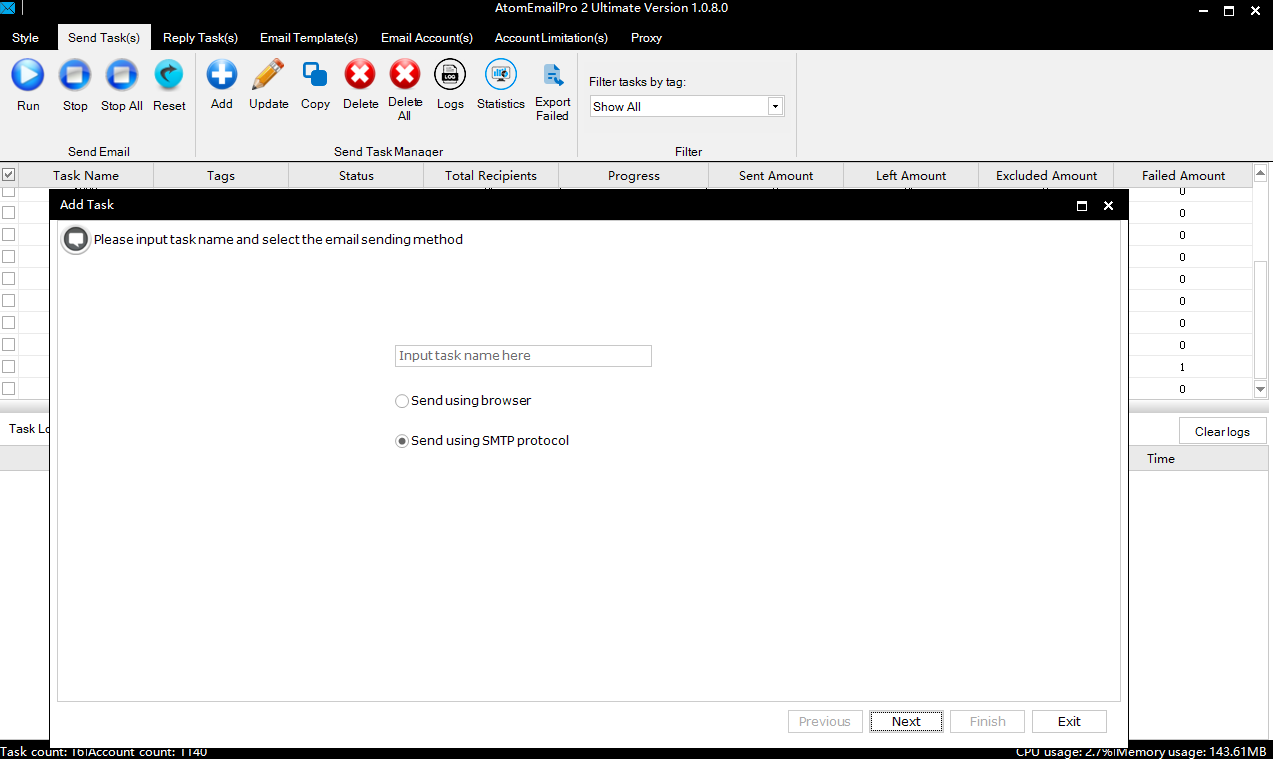
AtomEmailPro is built for marketers who don't want their email workflow limited to a single sending method.
It supports SMTP sending while also providing browser-based automation for supported webmail platforms.
This gives you the flexibility to choose how you want to send.
Use SMTP when SMTP makes sense.
Use browser automation when webmail makes sense.
Use both when your operation needs both.
That's the main idea behind AtomEmailPro.
Email Automation Is More Than Sending More Emails
For marketers, automation is not simply about increasing the number of emails sent.
It is also about reducing repetitive work and creating a workflow that fits the way you actually operate.
If your accounts are managed through webmail, browser-based automation gives you another way to automate that process.
If your infrastructure is based on SMTP, you can continue using SMTP.
And if you use both types of accounts, you don't have to choose only one.
The Real Question
The next time you evaluate an email marketing tool, don't start with:
"How many features does it have?"
Start with:
"How can it send my emails?"
SMTP?
Browser-based webmail automation?
Or both?
For marketers who need flexibility, having both options in one platform can be much more useful than being limited to a single sending method.
AtomEmailPro: SMTP + Browser-Based Email Automation
AtomEmailPro combines two approaches in one platform:
SMTP sending + browser-based webmail automation.
If your email marketing workflow involves both SMTP and webmail accounts, you don't have to choose one approach.
You can use the method that fits your account and your workflow.
One platform. Two sending methods. More flexibility for email marketers.