



How to Fill Email Password vs App Password in AtomEmailPro (Very Clear Guide)
When adding an account in AtomEmailPro, many users get confused:
👉 Which password should go into which field?
This guide will explain it in the simplest way possible, based on how you actually use the software.
🔑 The Most Important Rule (Read This First)
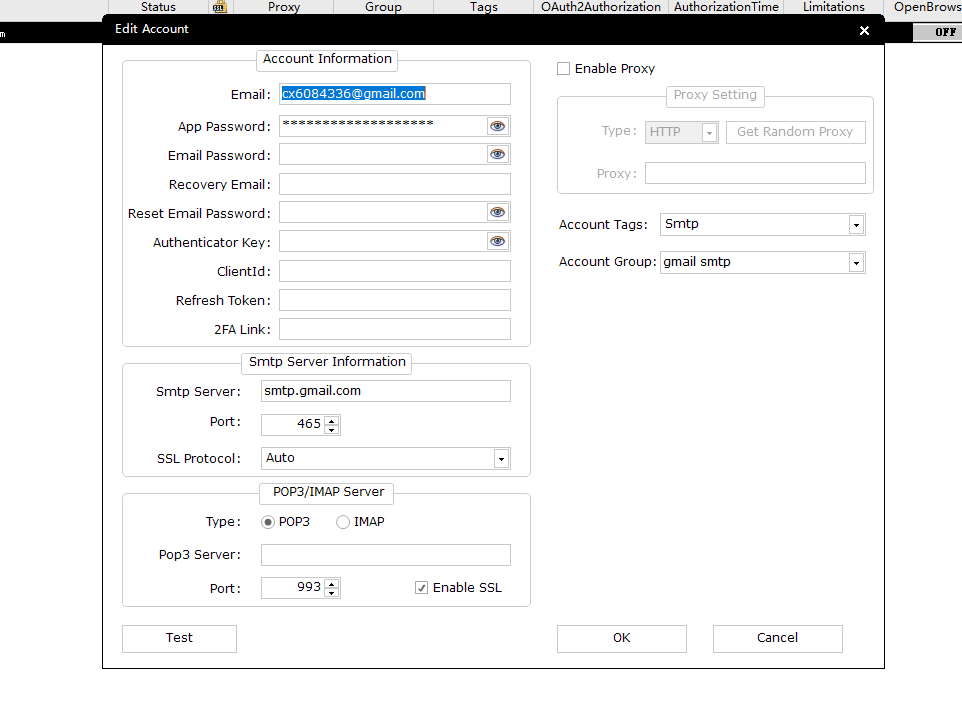
In AtomEmailPro, it depends on how you send emails:
✅ If you use web login (browser sending):
👉 Fill your email password into the Email Password field
✅ If you use SMTP sending:
👉 Fill your App Password (or email password) into the App Password field
1. What is “Web Login Sending”?
This means:
- The software opens a browser
- Logs into your email (like a human)
- Sends emails from the web interface
👉 Just like you manually log into Gmail / Outlook / Yahoo
✔ What to fill:
- Email Password field → your normal email password
2. What is “SMTP Sending”?
This means:
- The software sends emails through SMTP server
- No browser login involved
👉 This is a technical sending method
✔ What to fill:
- App Password field →
- App Password (if required), OR
- Your normal email password (for some email types)
3. Examples (Very Easy to Understand)
✅ Gmail
- Web login sending →
Email Password = your Gmail password - SMTP sending →
App Password = must generate in Google
✅ Outlook / Hotmail
- Web login sending →
Email Password = your password - SMTP sending →
- No 2FA → use normal password
- With 2FA → use App Password
✅ Yahoo Mail
- Web login sending →
Email Password = your password - SMTP sending →
App Password = must generate
✅ Domain Email (Company Email)
- Web login → may not be supported
- SMTP sending →
👉 App Password = same as your email password
4. Common Mistake
❌ Filling everything into the wrong field
Example:
- Using SMTP but putting password in “Email Password”
- Or using web login but not filling Email Password
👉 Result: login fail or sending fail
5. Final Simple Memory Trick
Just remember this:
👉 Web login → use Email Password field
👉 SMTP sending → use App Password field
That’s it. No need to overthink.