



Why Bigger Screens Improve Productivity for Email Automation Workflows
The Screen Is No Longer Just a Display
A computer screen used to be just a tool for viewing documents, browsing websites, and completing simple tasks.
But modern digital work has changed.
Today, marketers, entrepreneurs, and automation users often need to manage multiple accounts, dashboards, campaigns, and workflows at the same time.
This is why many professionals choose larger monitors, ultrawide displays, or multi-monitor setups.
A bigger workspace is not about having a bigger picture.
It is about having more control.
When your workflow involves multiple tasks running simultaneously, your screen becomes a command center.
Why Do Professionals Need Larger Workspaces?
In traditional office work, people usually focus on one task at a time.
Open a document.
Write an email.
Check a report.
Switch to another application.
But digital marketing workflows are different.
A marketer may need to manage:
- Multiple email accounts
- Different campaigns
- Sending schedules
- Analytics dashboards
- Customer lists
- Automation tools
Constantly switching between windows wastes time and reduces productivity.
A larger workspace allows users to arrange everything clearly.
For example:
Left side: Email accounts and campaign settings
Center: Automation tasks and sending processes
Right side: Reports and performance monitoring
Instead of searching through dozens of tabs, everything is visible at once.
Multi-Window Workspaces Create Better Automation Control
Automation does not mean you stop monitoring your workflow.
Professional users still need visibility.
When running email automation tasks, they often need to check:
- Task status
- Account activity
- Sending progress
- Campaign performance
- System notifications
A well-organized workspace makes these tasks easier.
Large screens and multiple windows create a better environment for managing complex workflows.
This is especially useful for users who handle large-scale email operations.
The Connection Between Large Screens and Email Automation
Email marketing has evolved.
Sending a few emails manually is no longer the challenge.
The challenge is managing:
- Multiple sender accounts
- Large contact lists
- Different campaigns
- Multiple sending tasks
Modern email automation tools help users simplify repetitive operations.
For example, browser-based automation platforms such as AtomEmailPro allow users to manage email sending workflows through automated processes.
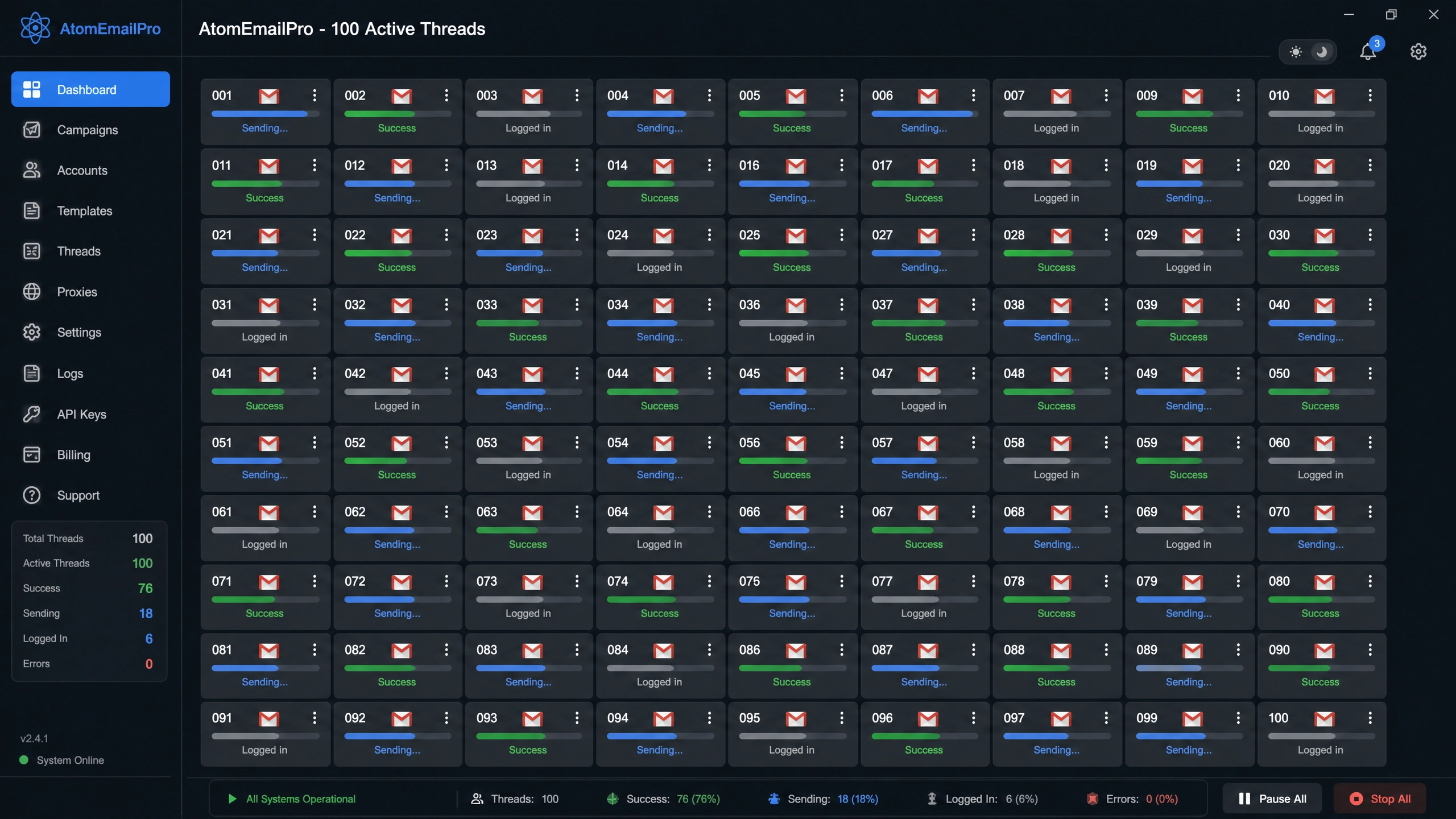
Instead of manually opening every mailbox and repeating the same actions, users can organize tasks, monitor progress, and manage multiple sending workflows more efficiently.
The goal is simple:
Less manual work.
Better organization.
Higher productivity.
More Threads, More Efficient Workflows
In automation workflows, efficiency often comes from running multiple processes at the same time.
Multi-thread processing allows different tasks to work simultaneously instead of waiting for each action to finish.
This concept is similar to having multiple monitors.
A bigger workspace allows you to see more information.
More threads allow you to process more tasks.
Together, they create a smoother workflow.
However, productivity is not only about increasing numbers.
Good automation also requires:
- Proper account management
- Stable workflows
- Monitoring
- Organization
Scaling without control can create unnecessary problems.
Your Computer Can Become a Digital Command Center
Many professionals are moving from simple computer usage to complete digital workstations.
A powerful workspace may include:
- Large monitors
- Multiple browser windows
- Automation software
- Data dashboards
- AI tools
The purpose is not complexity.
The purpose is efficiency.
The best setup is the one that allows you to focus on important decisions instead of repetitive operations.
The Future of Email Automation Workflows
As businesses continue to use more digital channels, managing online operations will become increasingly complex.
Future marketers will not work with one inbox or one campaign.
They will manage multiple systems, accounts, and automated workflows.
A well-designed workspace will become just as important as the tools themselves.
Large screens, organized layouts, and automation technologies together create a more efficient digital environment.
Conclusion
A bigger screen does not automatically make someone more productive.
But when combined with the right workflow, automation tools, and organization methods, a larger workspace can dramatically improve efficiency.
For professionals managing email campaigns, multiple accounts, and automated tasks, the combination of:
- Better screen organization
- Multi-window management
- Multi-thread automation
- Centralized workflow control
creates a smarter way to work.
The future of productivity is not just about working harder.
It is about building a better digital workspace.