



AtomEmailPro vs. SMTP Mailers: The Core Difference Is How You Send Email
When people compare AtomEmailPro with traditional email marketing software, the comparison often starts with features: threads, personalization, HTML emails, attachments, account management, and so on.
But there is a more important difference that is easy to overlook:
They can use a fundamentally different way to send email.
Traditional mailers are generally built around SMTP. AtomEmailPro takes a different approach by supporting browser-based sending through webmail platforms such as Gmail and Outlook Web.
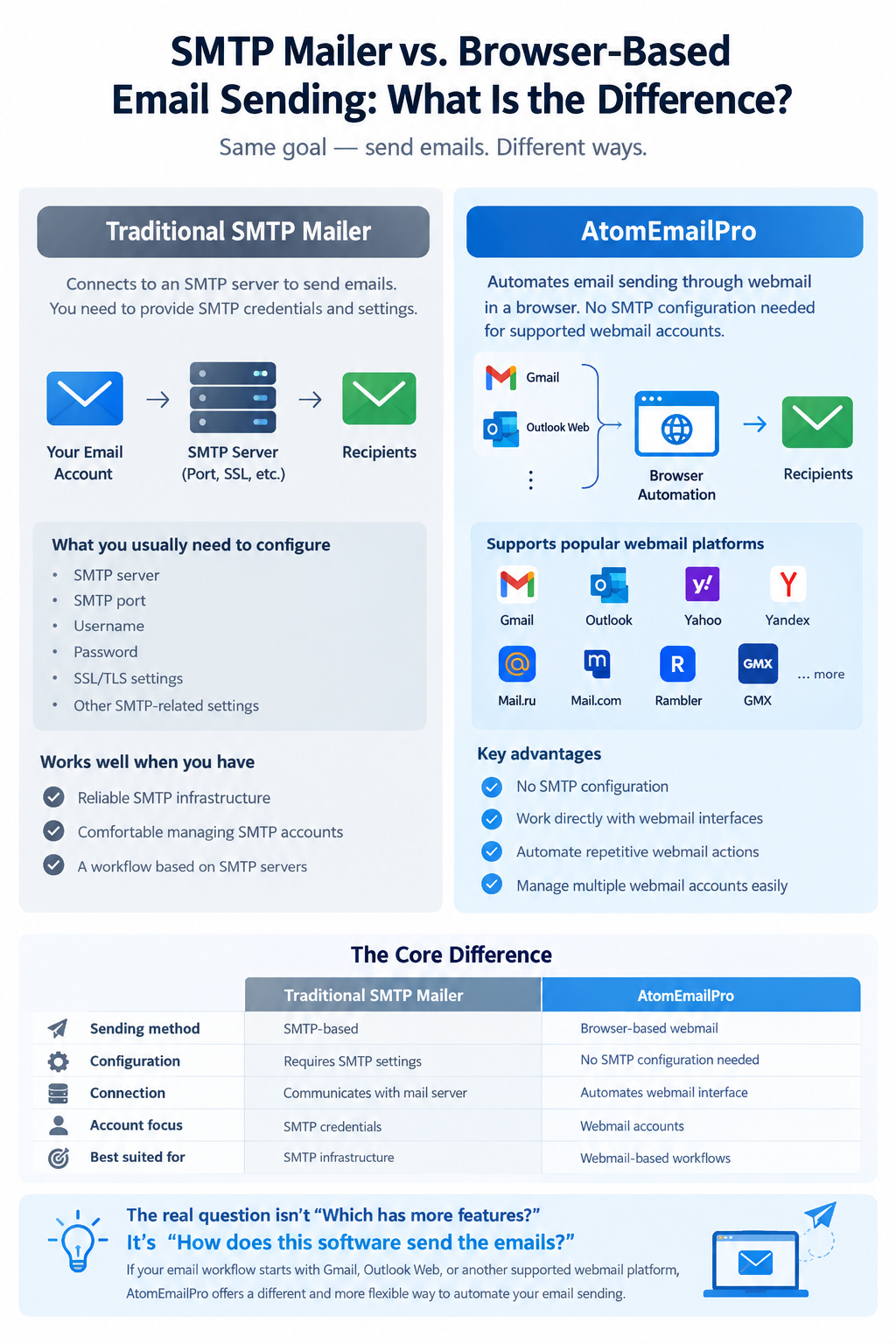
This difference affects how accounts are connected, how emails are sent, and what kind of workflow you can build.
SMTP Mailers: Sending Through the Mail Server
Traditional bulk mail software usually works by connecting to an SMTP server.
The basic workflow looks like this:
Email account → SMTP credentials → SMTP server → Recipient
You normally need to provide information such as:
- SMTP server
- SMTP port
- Username
- Password
- SSL/TLS settings
- Other SMTP-related configuration
Once the SMTP connection is established, the software communicates directly with the mail server to submit messages.
This approach is well established and works well when you have reliable SMTP infrastructure and are comfortable managing SMTP accounts and settings.
However, SMTP is not the only way to send email.
AtomEmailPro: Browser-Based Webmail Sending
AtomEmailPro supports a different workflow.
Instead of requiring an SMTP server configuration for supported webmail accounts, it can automate sending through the webmail interface in a browser.
For example:
Gmail Web → Browser Automation → AtomEmailPro → Recipients
or
Outlook Web → Browser Automation → AtomEmailPro → Recipients
The important point is that AtomEmailPro is not simply an SMTP mailer with another interface.
It is designed around browser-based email automation.
You can work with supported webmail accounts directly through their web interfaces instead of having to configure SMTP credentials for every account.
The Key Difference
The easiest way to understand the difference is this:
| Traditional SMTP Mailer | AtomEmailPro |
|---|---|
| SMTP-based sending | Browser-based webmail sending |
| Requires SMTP configuration | Works through supported webmail interfaces |
| Communicates with the mail server | Automates the webmail interface |
| SMTP credentials are central to the workflow | Webmail accounts are central to the workflow |
| Best suited to SMTP-based infrastructure | Useful when you want to automate webmail sending |
This is the core difference between the two approaches.
The question is not simply "Which software has more features?"
The better question is:
"Which sending method fits my email workflow?"
Why Browser-Based Sending Matters
Many people already use Gmail, Outlook, Yahoo, Yandex, GMX, and other webmail services every day.
Their normal workflow is:
- Open the webmail website.
- Log in to the account.
- Click Compose.
- Enter the recipient.
- Write the message.
- Click Send.
AtomEmailPro automates this type of browser-based workflow.
Instead of manually repeating the same actions across accounts, you can use automation to handle repetitive sending tasks.
This can be particularly useful when your workflow is based on webmail accounts rather than dedicated SMTP infrastructure.
No Need to Treat SMTP as the Only Option
SMTP is still useful. There is nothing wrong with using SMTP when it is the right solution for your setup.
The difference is that AtomEmailPro gives users another option.
If your accounts are primarily used through Gmail or Outlook Web, you may not want your entire workflow to depend on finding and configuring SMTP settings for every account.
With browser-based sending, the workflow can stay closer to the way the account is normally used.
Webmail account → Browser → Automated sending
That is the main idea behind AtomEmailPro.
More Than Just Bulk Email Sending
AtomEmailPro is also useful for workflows where the goal is not simply to send a huge number of messages.
For example, some users may want to automate a smaller number of emails from their existing webmail accounts.
In this situation, the value is not necessarily the number of emails sent.
The value is the ability to automate repetitive email operations while continuing to work with webmail.
This makes AtomEmailPro suitable for both larger email campaigns and smaller-scale automated sending workflows.
Browser Sending and Email Account Management
When managing multiple accounts, another difference becomes important.
With an SMTP-based workflow, each account may require its own SMTP information and configuration.
With browser-based automation, the focus shifts toward managing the webmail accounts and their browser sessions.
AtomEmailPro provides tools for organizing accounts, assigning threads, using proxies where appropriate, and automating repetitive operations.
The result is a different type of email automation workflow.
AtomEmailPro Is Not Trying to Replace Every SMTP Mailer
This distinction is important.
If your entire infrastructure is based on SMTP servers and you specifically need an SMTP-focused mailer, an SMTP solution may be the better choice.
AtomEmailPro is aimed at users who want something different:
Automated email sending through webmail in a browser.
That is its core competitive position.
Rather than asking:
"Can this software send bulk emails?"
Ask:
"How does this software send the emails?"
That question reveals the real difference.
SMTP vs. Browser-Based Sending: Which One Should You Choose?
Choose an SMTP-focused mailer when:
- Your workflow is built around SMTP servers.
- You already have established SMTP infrastructure.
- You prefer managing SMTP credentials and server settings.
- Your sending process does not depend on webmail interfaces.
Consider AtomEmailPro when:
- You want to automate Gmail or Outlook Web sending.
- Your workflow is based on webmail accounts.
- You want to avoid configuring SMTP for every supported webmail account.
- You manage multiple webmail accounts.
- You want browser-based automation for repetitive email sending tasks.
Neither approach is universally better.
They simply solve the problem in different ways.
The Core Position of AtomEmailPro
The biggest difference between AtomEmailPro and traditional SMTP mailers is not a single feature.
It is the sending architecture.
Traditional mailers generally start with:
SMTP server → Email sending
AtomEmailPro starts with:
Webmail account → Browser automation → Email sending
That is why AtomEmailPro should not be viewed as simply another SMTP bulk mailer.
It is a browser-based email automation tool designed to automate webmail sending.
If your email workflow starts with Gmail, Outlook Web, or another supported webmail platform, this difference can be much more important than a long list of feature comparisons.